HOME/BLOG/I REBUILT MY SAAS IN A WEEKEND (HERE'S WHAT 6 MONTHS OF AI LEARNING MADE POSSIBLE)
AI Building
I Rebuilt My SaaS in a Weekend (Here's What 6 Months of AI Learning Made Possible)
The punchline is fast. The real story took 6 months to build.
February 8, 2026|5 min read
I rebuilt SPARKlinks from scratch in a weekend. Well, Friday through Monday.
And it was 'sort of' from scratch (I had a non-functioning version elsewhere).
Not patched. Not fixed. Rebuilt.
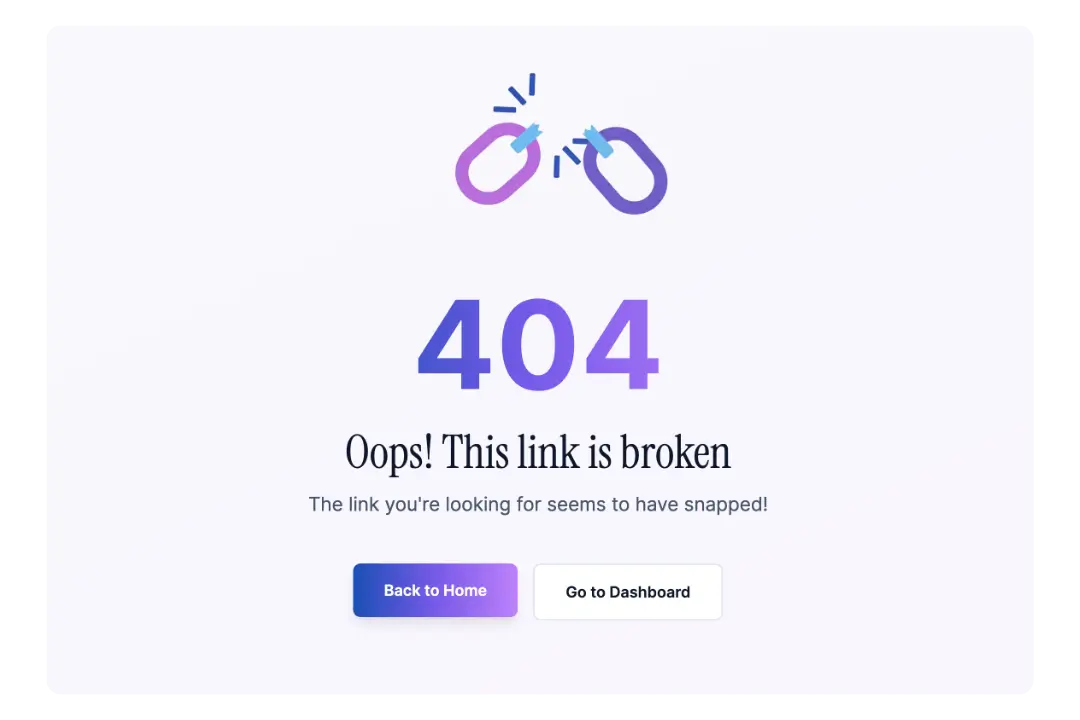
From the first prompt to a live site with authentication, a dashboard, referral system, legal pages, and a 404 page with a broken chain link that makes me unreasonably happy. (Simple pleasures, right?)
But here's what I want you to understand: six months ago, this would have taken me weeks. It actually did take weeks to build the first version — and that version still wasn't working the way I wanted. Or I might have hired someone. Or... let's be honest... I would have abandoned it halfway through because something else seemed easier.
What changed wasn't the tool.
It was me.
The Problem I Was Actually Solving
Before I get into the "how," let me tell you the "why" — because it matters.
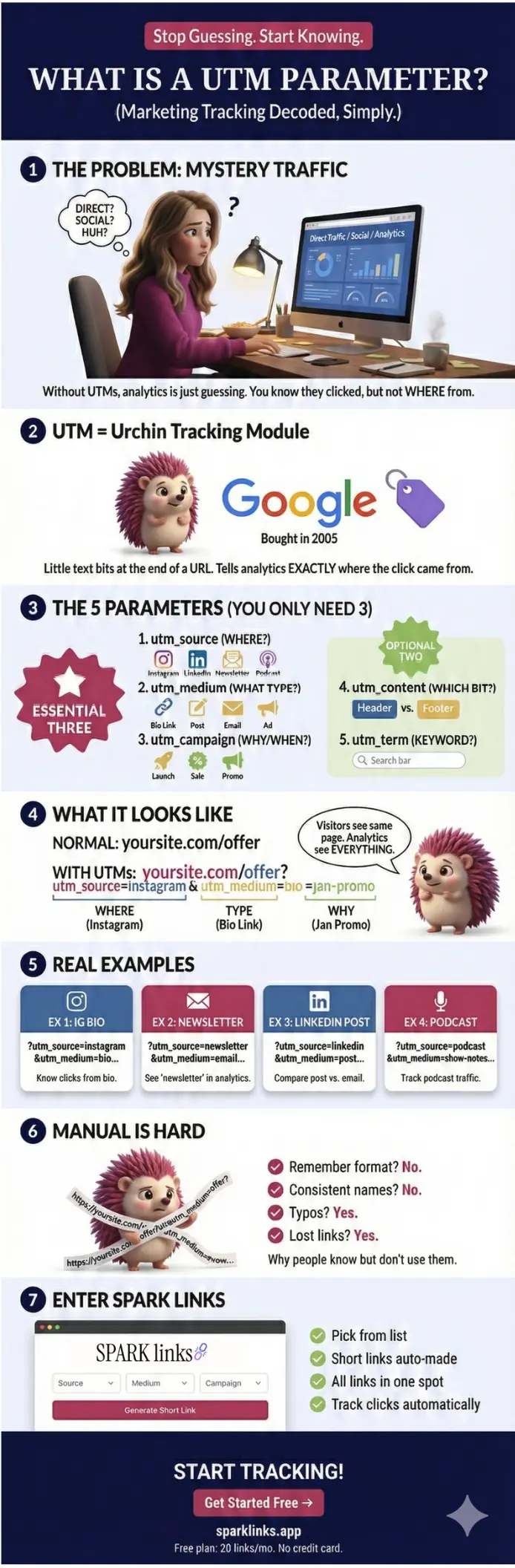
Have you ever tried to create a UTM link? You know, those tracking links that tell you where your traffic actually comes from?
The tools out there ask you things like:
Source (wait, isn't that the same as medium?)
Medium (what's the difference again?)
Campaign (versus... content?)
Content (I thought that was the campaign?)
It's like they were designed by developers who never had to explain marketing to a normal person.
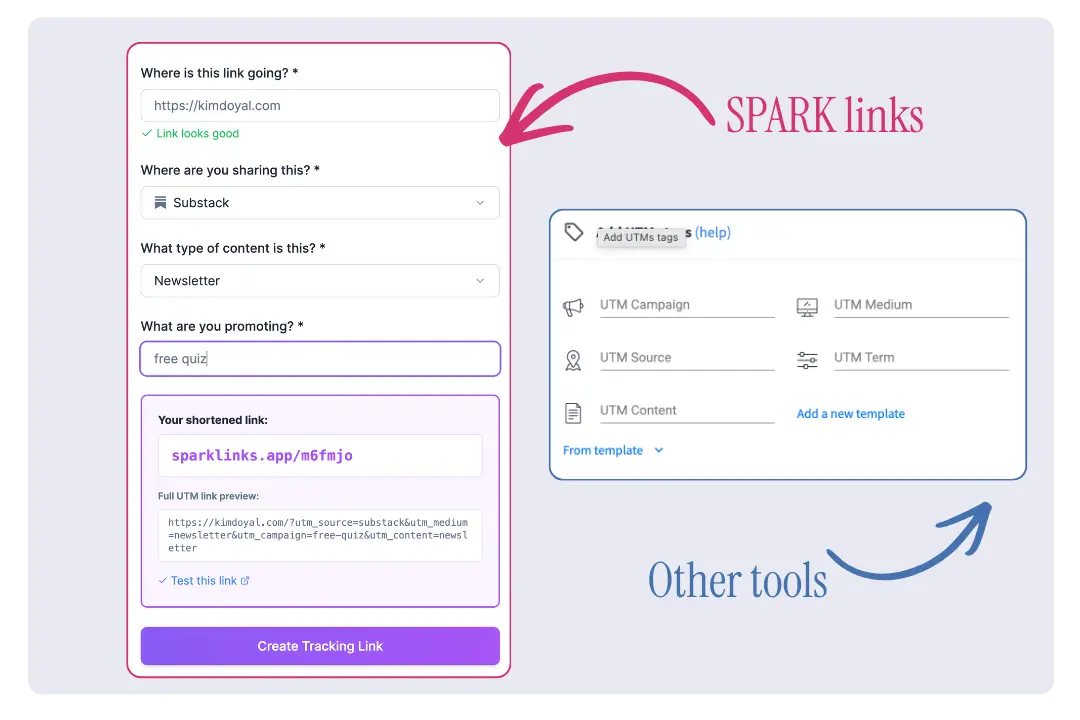
I wanted something simpler (and something that looked better). Something that asked:
Where is this link going? (your destination URL)
Where are you sharing it? (Instagram, email, YouTube, etc.)
What are you promoting? (your campaign name)
What type of content is it? (bio link, main post, first comment, etc.)
That's it. Human language. Platform-aware options. Automatic UTM generation behind the scenes.
Traditional UTM builder with confusing fields compared to SPARKlinks simple interface" Caption: “Right: What most UTM builders look like. Left: What I built instead.
I'd built SPARKlinks before. But the first version had issues — things weren't working, the build felt clunky, and I knew I'd eventually have to rebuild it.
So I finally did.
What Made This Weekend Different
Here's the thing... I've been saying "planning first" for a while now, and I genuinely believe it. But this weekend was proof of what happens when you combine that planning-first mindset with six months of daily AI practice.
Every single day, I've been working with these tools. Building things. Breaking things. Figuring out how to communicate with AI in a way that actually gets results. And all of that compounds.
The patterns I've been documenting: in my workflow notes, my learnings about how different tools work, my understanding of how to give clear instructions — they all stack on top of each other.
This weekend wasn't magic. It was compound learning paying off.
Six months ago, I was still figuring out how to structure a 'build prompt' so the AI wouldn't go rogue on me. Now? I can sit down on a Friday night, plan it all out, and have a working app by Monday.
That's not because I got smarter. It's because I've been practicing.
The Initial Prompt That Started Everything
I want to show you the exact prompt that kicked off this rebuild. Because what you'll notice is: it's not fancy. It's clear.
And yes, this is exactly how I talk to AI. 😉
Here's how I started the session:
"Okay, I want to start dragging over screenshots for SPARKlinks. We talked about this last night. Actually, really quick, I think you need to do a pull down from GitHub to update things, please.
Okay, I think I've got all of the screenshots in there, and you pulled everything down from last night. I think the initial plan was to do like a Phase 1 free, and then launch paid once I've got some people, some users, and stuff. So I think what we need to do now is I had actually started something. It's SparkLinks 2, but I think I'm going to delete the app — the second one. And we can start from scratch.
So, what I want you to do is go through all of the screenshots, take a look at — I'm assuming you can see the flow and what not. The creating the link wasn't working on this, so I couldn't show you, but you'll be able to see on the screenshot where it lists in the dashboard the links..."
I gave:
✔️ Context ✔️ I referenced previous work ✔️ I pointed to screenshots as visual references ✔️ I told the AI what I wanted to keep and what I wanted to approach differently.
And then I said the key thing:
"You go review everything, come back with questions. I'm gonna go make something to eat really quick, and we can start cracking on this."
That's it. No elaborate prompt engineering. Just clarity about what I wanted, visual references to work from, and trust that we could figure it out together.
Read that again. I told the AI to review everything and come back with questions while I made food (please tell me I'm not the only one who shares irrelevant tidbits with a tool).
This is what working with AI actually looks like. It's not some perfectly crafted mega-prompt. It's a conversation.
The Approach: Structure Before Speed
Before I wrote a single prompt for Claude Code (inside of Cursor), I did the unsexy work first.
The planning documents:
Complete dropdown structure mapping: 11 traffic sources, conditional content types for each. Every platform has its own set of content-type options, because sharing a link in an Instagram bio is different from sharing it in a YouTube description. That specificity matters.
A PRD with the full design system: colors, fonts, components. All was decided before I touched the builder (trust me, this is painful for me, lol. I love seeing the visual output of my efforts asap).
Database schema covering Users, Links, Clicks, and Referrals. The structure that holds everything together.
17 structured prompts, in order, with notes on which screenshots to upload with each one. Seventeen. In sequence. With context.
When I started building on Saturday, there was zero ambiguity about what I was creating. None.
And that's the part most people skip. They jump straight into the builder, start prompting, and then wonder why they're going in circles three hours later.
This is exactly how I was building when I started this less than a year ago. I just jumped in.
The Weekend Timeline
Friday night: Planning docs. PRD. Prompt structure. Screenshots organized. (Yes, I was doing this on a Friday night. This is what I do for fun. Don't judge me. 😂)
Saturday: Public pages — homepage, features, pricing, how it works. Then, authentication with Google OAuth. Dashboard. Create a link modal. Links management page.
Sunday: Polish mode. Icons instead of emojis (this matters more than you think). Custom dropdown components. Legal pages. Cookie consent banner with a cute cookie image. That 404 page with the broken chain link. SEO metadata. Referral system.
Monday morning: Domain pointed. Site audit. A few fixes.
That's it. Four days, start to finish.
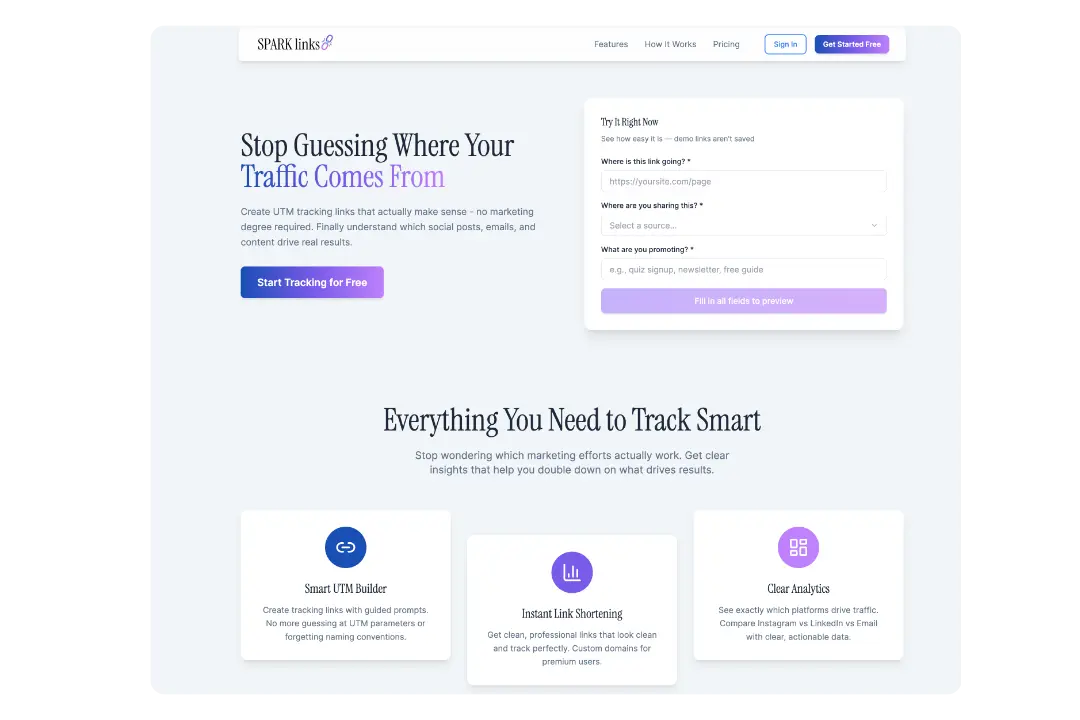
The finished homepage — built from scratch in a weekend.
What Actually Made It Fast
Let me be specific here, because "I used AI" isn't helpful advice. That's like saying "I used a computer." Okay... but what did you actually do?
Visual references beat descriptions every time. Instead of trying to describe what I wanted (which is how you end up with something that looks nothing like what's in your head), I uploaded 28 screenshots from the previous version. The AI could see the layout, the colors, the flow. When something needed to change, I'd say "like this, but without the pencil icon." Done.
Structured prompts with context. Each prompt referenced what came before. "Now that we have the dashboard, let's build the Create Link modal. Here's what should happen..." I didn't start from scratch each time. I built on context. The AI knew what we'd already done, and each new prompt moved us forward instead of sideways.
Iterative debugging, not starting over. When the Create Link button wasn't saving to the database, I didn't panic. I didn't scrap the whole thing and start over. I gave specific information: "I click Create Tracking Link, the success modal appears, but when I click View in Dashboard, no link is there. The copy button also doesn't work." Specific problem. Specific fix. Move on.
Design decisions made upfront. Colors: purple gradient (#8B5CF6 to #7C3AED). Font: Instrument Sans. Consistent icon library. All of this was decided before I started building, not figured out in the middle of a session when I was already tired and making sloppy choices.
Knowing when to accept "good enough." The first version of the demo link preview blended into the page. I asked for a border and better contrast. Done. The admin link was showing in the footer for public users. Quick fix prompt. Done. Not everything has to be perfect in the first pass. It needs to work. You can polish later.
The Compound Effect
Here's what I keep coming back to: none of this happened because I'm particularly smart or technical.
I'm not a developer. I've never been a developer. I don't want to be a developer.
This happened because I've spent six months practicing. Every single day.
Every project taught me something. The quiz rebuild taught me about planning first. The SEO tool taught me about database structure. Daily conversations with AI taught me how to give clear instructions. Debugging sessions taught me how to describe problems in a way that actually leads to fixes instead of more problems.
I've been documenting all of it as I go — patterns about workflow, platform quirks, how to communicate with different tools, what works and what absolutely doesn't.
And this weekend? It was just applying all of it at once.
Let that sink in.
Six months of daily practice, compressed into one weekend of execution. That's what compound learning looks like in practice.
The Meta Moment
You know what's kind of funny?
I'm writing this article with AI too.
The same patterns apply: give context, be specific about what I want, iterate based on what comes back, trust the process.
And you're reading the result.
What's Next for SPARKlinks
The site is live. The core features work. But I'm not done.
Testing the referral system with friends before opening it up wider
But the foundation? It's solid. And I know it's solid because I planned it that way.
[SCREENSHOT PLACEHOLDER: The Dashboard with the four widget cards (Recent Links, This Month, Referrals, Account)] Alt Text: "SPARKlinks dashboard showing four widget cards with recent links, monthly usage, referral program, and account info" Caption: "The dashboard — a real home base, not just a redirect to the links page."
What This Means for You
If you've been thinking about building something — an app, a tool, a system for your business — here's what I want you to take away from this.
You don't need to be technical. I'm not a developer. I'm an entrepreneur who learned how to communicate with AI tools. That's a skill you can learn too. And honestly? Your business experience is a bigger advantage than you think. You already know what problems need solving. That's the hard part.
You do need to be patient. Not with the building (that part can be fast once you know what you're doing). With the learning. With the daily practice. With the compound effect that takes time to show up but changes everything when it does.
Planning is building. The PRD, the screenshots, the prompt structure — that's not procrastination. That IS the work. It's the work that makes everything else faster. I know it doesn't feel productive when you're organizing folders and writing specs instead of "actually building." But trust me on this one.
Six months from now, you could be doing this too. If you start practicing today.
The gift of going all in isn't just building things faster. It's building things that actually work.
SPARKlinks is live at sparklinks.app. Create a free account and start tracking where your traffic actually comes from — because guessing is not a strategy. 😉
And if you're curious about your own relationship with AI tools, take the Find Your AI Path quiz. It'll help you figure out where to focus your learning.
Even the 404 page got love. Because details matter.UTM parameters don't have to be confusing. This is why I built SPARK Links — human language, automatic tracking, no guessing. Start free at sparklinks.app.
Kim Doyal
Kim Doyal is a digital marketing strategist and AI builder with 18 years of online business experience. She is the founder of AI Spark Studios and SPARK Lab, and the creator of The Hub — a custom 33-agent AI operating system that runs her entire business. She has also built kimdoyal.com, StackRewards, and multiple AI tools and agents using vibe coding, a natural language approach to building software without a traditional development background.